Three sides good, four sides bad.
Sunday, 30th November 2008
Work on the TI-83+/TI-84+ port of BBC BASIC continues bit-by-bit.


I've added triangle filling (left) and, by extension, parallelogram filling (right) PLOT commands. The triangle filler is a little sluggish, tracing each edge of the triangle using 16-bit arithmetic, but it seems fairly robust. I am trying to focus on robustness over speed for the moment, but it would seem easy enough to add a special-case triangle edge tracer if both ends of the edge can fit into 8-bit coordinates (all inputs to plot commands use 16-bit coordinates).
The parallelogram on the right is specified with three coordinates, and the fourth point's position is calculated with point3-point2+point1. As parallelograms are drawn as two triangles there's an overdraw bug when they are drawn in an inverting plotting mode.

This needs to be fixed.
The BBC Micro OS exposed certain routines in the &FF80..&FFFF address range. These routines carried out a wide variety of tasks, from outputting a byte to the VDU to reading a line of input or changing the keyboard's auto-repeat rate. BBC BASIC (Z80) lets the person implementing the host interface catch these special-case calls, so I've started adding support for them. A friend very kindly donated copies of three BBC Micro books, including the advanced user guide (documenting, amongst other things, the OS routines) and the BASIC ROM manual.
 As an example, if you write the value 16 to the VDU it clears the text viewport. BBC BASIC has the CLS keyword for this, but you can also send values directly to the VDU with the VDU statement, like this: VDU 16. This in turn calls the BBC Micro's OSWRCH routine, located at &FFEE, with the accumulator A containing the value to send to the VDU. An alternative method to clear the text viewport would therefore be A%=16:CALL &FFEE.
Now, you may well be wondering how this is of any use, given the existance of a perfectly good CLS statement (or, failing that, the VDU statement). The usefulness becomes apparent when you remember that BBC BASIC has an inline assembler. There is no CLS or VDU instruction in Z80 assembly, but by providing an OSWRCH routine you can interact with the host interface and so clear the screen from an assembly code routine; in this case [LD A,16:CALL &FFEE:] (square brackets delimit assembly code).
Sadly, there is a limitiation in the TI-83+/TI-84+ hardware that prevents this from working seamlessly. The memory in the range &C000..&FFFF, where these routines reside, is mapped to RAM page 0. RAM page 0 has a form of execution protection applied to it, so if the Z80's program counter wanders onto RAM page 0 the hardware triggers a Z80 reset. To this end all of these OS calls are relocated to &4080..&40FF, so in the Z80 assembly snippet above you would CALL &40EE instead. This only applies to CALLs made from assembly code - the BASIC CALL statement traps calls to the &FF80..&FFFF so they can be redirected seamlessly to retain compatibility with other versions of BBC BASIC (Z80).
After all this work I noticed that the host interface was crashing in certain situations, especially when writing to a variable-sized file in a loop. This is the sort of bug that is tricky to fix; sometimes it would crash instantly, sometimes it would write the first 5KB of the file fine then crash.
It turned out to be a bug in the interrupt service routine (ISR). In this application the ISR is used to handle a number of tasks such as trapping the On key being pressed to set the Escape condition or to increment the TIME counter (as well as other time-related features such as the keyboard auto-repeat or cursor flash). On the TI-83+, which doesn't have a real-time clock, it also calls a RTC.Tick function approximately once per second to update the (very inaccurate) software real-time clock. To call this function it uses the BCALL OS routine. It appears that if the BCALL routine was used from an ISR when the TI-OS was in the process of enlarging a file it would crash. Removing the call to RTC.Tick appears to have fixed the bug entirely.

It is possible to put BBC BASIC into an infinite loop if you make a mistake in your error handler. In the above example program the error handler in line 10 fails to bail out on an error condition, running back into line 20 that itself triggers a division by zero error. You cannot break out of the loop by pressing On as that works by triggering an error (error 17, Escape). To improve safety I've added a feature whereby holding the On key down for about 5 seconds causes BBC BASIC to restart. This loses the program that was previously loaded in RAM, but you can retrieve with the OLD statement.
I've also rewritten all of the "star" commands. These are commands, usually prefixed with an asterisk, that are intended to be passed to the OS. As the TI-83+/TI-84+ does not have an especially useful command-line driven interface (most of the UI is menu-driven) I've implemented this part myself, basing its commands on ones provided by the BBC Micro OS. For example, *SAVE can be used to save a block of memory to a file, or *CAT (aliased to *DIR and *.) can be used to show a list of files.

In the case of *CAT I've added a pattern-matching feature that lets you use ? and * as wildcards to limit the files shown.
After noticing that *COPY took three seconds to copy an 860 byte file I optimised some of the file routines to handle block operations more efficiently. Reading and writing single bytes at a time is still rather sluggish, but I'm not sure that there's much I can really do about that.

Finally, for a bit of fun I noticed a forum post enquiring about writing assembly programs on the calculator. Here's a program that assembles a regular Ion program using BBC BASIC's assembler.
BBC BASIC's improved filling, *EXEC and Lights Out
Thursday, 13th November 2008
Progress on the TI-83+/TI-84+ port of BBC BASIC continues - I'm hoping to get a beta release out soon. 


I've done quite a lot of work on the graphics features. Every shape that is plotted can be set to either the foreground colour, background colour or to invert the pixels it covers. This wasn't implemented properly (everything was always drawn in the foreground colour) which has been corrected.
The first image in the above group shows the flood-filler in action, filling inside and outside a triangle. The second image demonstrates the ellipse drawing and filling code by qarnos. It had a small amount of overdraw, which is not normally a problem, but in an inverting plot mode drawing a pixel twice causes it to reset to its original value. This ends up leaving gaps in the circle. Fortunately he was able to give me a lot of help in fixing it.
The third image demonstrates a non-standard feature I've added - being able to set your own fill patterns. The GCOL statement lets you set the foreground or background colour, and for values between black and white a dithered fill pattern is substituted instead. GCOLPAT takes a pointer to an 8×8 pixel fill pattern and subsequent fill operations will use that instead; passing FALSE (0) to GCOLPAT or setting a colour normally via GCOL reverts to the standard dither fills.
I've also done a small amount of benchmarking. There's a sample program in the TI-83+ guidebook that draws a Sierpinski triangle.

On a regular 6MHz TI-83+, the TI program takes 7 minutes and 8 seconds to run. A direct translation to BBC BASIC executes in 2 minutes and 21 seconds, and a simplified version executes in 1 minute and 56 seconds.

I'm also trying to improve the number of OS-level "star" commands. Above is a demonstration of *EXEC which reads console input from a text file. A file is opened for output using OPENOUT, some text is written into it using PRINT#, and then it it *EXECuted. This is one possible way of converting a text file into a BBC BASIC program.

Finally, I'm trying to write a game as an example program. The above screenshot shows an incomplete clone of the Lights Out game by Tiger Electronics.
TIME$ to resume work on TI-83+ BBC BASIC
Wednesday, 29th October 2008
It's been a while since I worked on the TI-83+ calculator port of BBC BASIC, and due to a relatively modular design some of the new features I'd been working on for the Z80 computer project version could be easily transferred across.
The first addition to the calculator port is the TIME$ keyword, which lets you get or set the system time.


That's all very well and good, but only the TI-84+ calculator has real-time clock hardware - the TI-83+ doesn't have any sort of accurate timekeeping to speak of. Rather than display an error when TIME$ is used I opted to use an inaccurate software-based clock. It uses the TI-83+'s timer interrupts (roughly 118Hz) to update the date and time about once a second. The clock is reset to Mon,01 Jan 2001.00:00:00 every time BBC BASIC is restarted and keeps abysmal time, but software designed to use the clock will at least run.
I have been transferring and amending documentation from Richard Russell's website to a private installation of MediaWiki. There are about 120 entries so far; having documentation puts me much closer to being able to make a release.
I have also fixed a handful of bugs. One that had me tearing my hair out was something like this:
  250 DEF PROC_someproc(a,b)
  260 a=a*PI
  270 ENDPROC
The program kept displaying a No such variable error on line 260. Well, a is clearly defined, and retyping the procedure in another program worked, so what was the problem here? I thought that maybe one of the graphics calls or similar was corrupting some important memory or modifying a register it shouldn't. It turns out that the problem lay in the Windows-based tokeniser - it was not picking up PI as a token, for starters, and was storing the ASCII string "PI" instead. On top of that, it was treating anything after a * as a star command, which aren't tokenised either. (Star commands, such as *REFRESH, are passed directly to the host interface or OS). Retyping the problematic lines caused BBC BASIC to retokenise them, which was why I couldn't replicate the problem in other programs. By fixing the tokeniser, everything started working again.
The source code for the analogue clock program is listed below.
   10 *REFRESH OFF
   20 VDU 29,48;32;
   30 GCOL 0,128
   40 REPEAT
   50   t$=TIME$
   60   hour%=VAL(MID$(t$,17,2))MOD12
   70   min%=VAL(MID$(t$,20,2))
   80   sec%=VAL(MID$(t$,23,2))
   90   sec=sec%/60
  100   min=(min%+sec)/60
  110   hour=(hour%+min)/12
  120   CLG
  130   GCOL 0,127
  140   MOVE 0,0
  150   PLOT 153,31,0
  160   GCOL 0,0
  170   FOR h=1TO12
  180     hA= h/6*PI
  190     hX=30*SIN(hA)
  200     hY=30*COS(hA)
  210     MOVE hX,hY
  220     DRAW hX*0.9,hY*0.9
  230   NEXT h
  240   PROC_drawHand(sec,30)
  250   PROC_drawHand(min,24)
  260   PROC_drawHand(hour,16)
  270   *REFRESH
  280 UNTIL INKEY(0)<>-1
  290 *REFRESH ON
  300 END
  310 DEF PROC_drawHand(pos,length)
  320 MOVE 0,0
  330 pos=pos*2*PI
  340 DRAW length*SIN(pos),-length*COS(pos)
  350 ENDPROC
I translated the tokeniser source code to PHP so that by pointing a browser to file.bbcs for a known file.bbc the highlighted, detokenised source code is served as HTML instead. Hurrah for mod_rewrite, and if you're using IIS Ionic's Isapi Rewrite Filter performs a similar job using the same syntax.
Z80 computer - Lines, cubes and inverted text
Sunday, 5th October 2008
I've made a few additions to the operating system for the computer. The Console module, which handles text input and output, now supports "coloured" text - that is you can set the text foreground and background colours to either black or white. This functionality is exposed via the BBC BASIC COLOUR statement. If you pass a value between 0 and 127 this sets the foreground colour (0..63 is white, 64..127 is black) and if you pass a value between 128 and 255 this sets the background colour (128..191 is white, 192..255 is black).
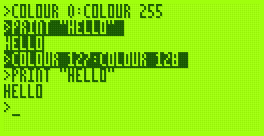
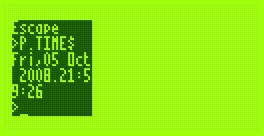
The image on the right also demonstrates another addition - you can set the text viewport to occupy a partial area of the display. This is most useful when coupled with the ability to define graphics viewports, which I have yet to add.
That said, I have started writing the Graphics module. So far all it can do is draw clipped lines, and this functionality is exposed via BBC BASIC's MOVE and DRAW statements. MOVE sets the graphics cursor position - DRAW also moves the graphics cursor, but also draws a line between the new position and the previously visited one.

I cannot use drawing code I've written for the TI-83+ version due to differences in the LCD hardware and the way that buffers are laid out. The popular way to lay out graphics buffers on the TI-83+ is as follows:
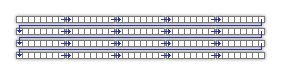
Each grey block represents 8 pixels - one byte in LCD memory represents 8 pixels grouped horizontally. The leftmost bit in each 8-pixel group is the most significant bit of each byte. The data is stored in the buffer so that each row of the LCD is represented by 12 consecutive bytes. This left-to-right, top-to-bottom arrangement should seem sensible to anyone who has worked with a linear framebuffer. However, due to the way that the LCD I'm using is arranged, I'm using the following buffer layout:
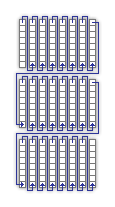
The LCD hardware groups pixels vertically, but when you write a byte to it its internal address pointer moves right. Furthermore, the most significant bit of each byte written is at the bottom of each group. This may sound a little confusing, but actually works out as more efficient. Writing text is easy; I'm using a 4×8 pixel font, so all I need to do is set the LCD's internal address counter correctly then write out four bytes, one for each column of the text (other sensible font sizes for the display, such as 6×8 or 8×8 are just as easy to display).
Another example of improved efficiency is if you deal with pixel-plotting routines. Each pixel on the display can be addressed by a buffer offset and an eight-bit mask to "select" the particular pixel in an eight-pixel group. With this arrangement, moving the pixel left or right is easy; simply increment or decrement the buffer offset by one. Moving the pixel up or down is a case of rotating the mask in the desired direction. If the rotation moves the pixel mask from one 8-pixel group to another (which only happens every eight pixels) the buffer offset needs to be moved by 128 in the correct direction to shunt it up or down.
On the TI-83+, moving the pixel up or down requires moving the buffer offset up or down by 12; moving the pixel left or right is a rotation as before with a simple buffer offset increment or decrement to move between 8-pixel groups.
In Z80 assembly incrementing or decrementing a 16-bit pointer by one is a single instruction taking 6 clock cycles; moving it by a larger offset takes at least 21 clock cycles, 42 if you include backing the temporary register such an operation would take.
What may be interesting to see is how well a raycaster would work on a system that has video memory arranged into columns.
Without wishing to be typecast as that programmer who loves spinning cubes, I also wrote a cube-spinning demo to test the line drawing routines as well as some integer arithmetic routines I've added (the Z80 can't multiply or divide, so these operations need to be implemented in software).
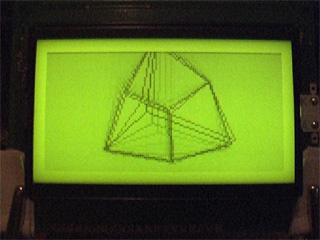
It runs fairly smoothly (bearing in mind the 2MHz clock speed). The second half of the video has the Z80 running at 10MHz; it actually seems quite stable even though the LCD is being accessed at nearly five times its maximum speed (the system did need to be reset a few times until it worked without garbling the display).
Fixed and scaled CHIP-8/SCHIP interpreter
Wednesday, 24th September 2008
The CHIP-8/SCHIP interpreter now seems happy enough to run games, though the lack of settings to control how fast or slow they run makes things rather interesting.
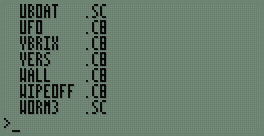
First of all, I've hacked together a painfully simple read-only file system. Each file is prefixed with a 13-byte header; 8 bytes for the filename (padded with spaces), 3 bytes for the extension (padded with spaces) and two bytes for the file size. The above file listing can be generated by typing *. at the BASIC prompt.
I've written a new sprite drawing routine that scales sprites up to double size when in CHIP-8 mode; this allows CHIP-8 games to fill the entire screen. Unlike the existing sprite code, which I've retained for SCHIP games, it runs entirely from ROM; the existing sprite code has to be copied to RAM as it uses some horrible self-modifying code tricks. I should probably rewrite that bit next.
As for the bug I mentioned in the last post, it was because of this:
; --- snip ---

; Group 9:
;   * 9XY0 - Skips the next instruction if VX doesn't equal VY.
InstructionGroup.9
	call GetRegisterX
	ld b,a
	call GetRegisterY
	cp b
	jp nz,SkipNextInstruction

; Group A:
;   * ANNN - Sets I to the address NNN.
InstructionGroup.A
	call GetLiteralNNN
	ld (DataPointer),hl
	jp ExecutedInstruction

; --- snip ---
If an instruction in the form 9XY0 is executed and VX == VY, rather than jumping to ExecutedInstruction the code runs on and executes the instruction as if it had been an ANNN as well, which ended up destroying the data pointer. Adding a jp ExecutedInstruction after the jp nz,SkipNextInstruction fixed the bug.
One other advantage of the zoomed sprites is that "half-pixel" scrolls also work correctly:
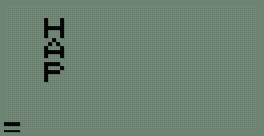
...not that I've seen any game that uses them.
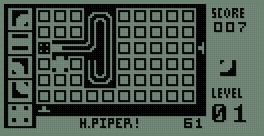
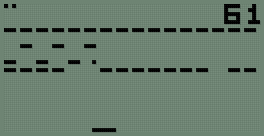
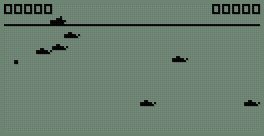
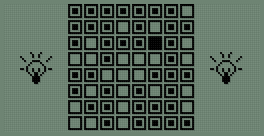
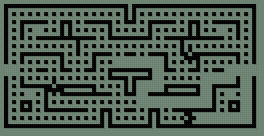
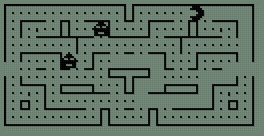
The last two screenshots show two versions of the game Blinky, one as a regular CHIP-8 program and the other taking advantages of the SCHIP extensions.