Gyrating cubes in BBC BASIC
Thursday, 12th June 2008
Work has been keeping me busy recently, but I've tried to set aside a small amount of time each evening to reclaim some sanity and do a little work on BBC BASIC. Not much progress has been made, but there has been some at least.


On the left is the program running on an 83+ SE at 15MHz, on the right on the regular 83+ at 6MHz. If you really wanted to do 3D in BBC BASIC you could probably get away with writing some of the more expensive operations — such as transforming/projecting vertices in batches — in assembly, but that would sort of go against the whole point of trying to write a program to test the speed of BASIC. 
Here's the rather naïve code:
   10 *REFRESH OFF
   20 DIM p%(15)
   30 fps%=0
   40 lfps%=0
   50 fpst%=TIME+100
   60 REPEAT
   70   rX=TIME/300
   80   rY=TIME/400
   90   SrX=SIN(rX)
  100   CrX=COS(rX)
  110   SrY=SIN(rY)
  120   CrY=COS(rY)
  130   pt%=0
  140   FOR x=-1TO1STEP2
  150     FOR y=-1TO1STEP2
  160       FOR z=-1TO1STEP2
  170         tX=y*CrX-x*SrX
  180         tY=-x*CrX*SrY-y*SrX*SrY-z*CrY
  190         tZ=3-x*CrX*CrY-y*SrX*CrY+z*SrY
  200         p%(pt%)=tX*40/tZ+48
  210         pt%=pt%+1
  220         p%(pt%)=tY*40/tZ+32
  230         pt%=pt%+1
  240       NEXT
  250     NEXT
  260   NEXT
  270   CLG
  280   PRINTTAB(10,0)lfps%" FPS"
  290   MOVE p%(0),p%(1)
  300   DRAW p%(4),p%(5)
  310   DRAW p%(12),p%(13)
  320   DRAW p%(8),p%(9)
  330   DRAW p%(0),p%(1)
  340   DRAW p%(2),p%(3)
  350   DRAW p%(6),p%(7)
  360   DRAW p%(14),p%(15)
  370   DRAW p%(10),p%(11)
  380   DRAW p%(2),p%(3)
  390   MOVE p%(4),p%(5)
  400   DRAW p%(6),p%(7)
  410   MOVE p%(12),p%(13)
  420   DRAW p%(14),p%(15)
  430   MOVE p%(8),p%(9)
  440   DRAW p%(10),p%(11)
  450   *REFRESH
  460   fps%=fps%+1
  470   IF TIME>fpst% THEN lfps%=fps%:fps%=0:fpst%=TIME+100
  480 UNTIL INKEY(0)<>-1
  490 *REFRESH ON
  500 END
I have also added support for the COLOUR statement (for changing the text foreground and background colour) and copy key editing.


Copy key editing, as demonstrated in the screenshot on the right, lets you break the text input cursor into two parts - a write cursor (which is left behind on the line you were editing) and a read cursor, which can be positioned anywhere on the screen. Pressing the copy key (in this case, XTθn) reads a character under the read cursor and writes it to the write cursor, then increments both.
One feature that's a bit more fun is the support of device files. This is a way of accessing external devices as if they were files. For example, by opening the file AT.DEV you can read and write bytes using the AT protocol (used by AT and PS/2 keyboards and mice) using BBC BASIC's built-in file manipulation routines.

You could use this to do something useful, or could just use this to flash the LED on a keyboard back and forth.
   10 keyb%=OPENOUT"AT.DEV"
   20 DATA 2,4,1,4,-1 : REM LED flash pattern (-1 terminated).
   30 REPEAT
   40   READ l%
   50   REPEAT
   60     PROC_setled(l%)
   70     PROC_pause(30)
   80     READ l%
   90   UNTIL l%=-1
  100   RESTORE
  110 UNTIL FALSE
  120 END
  130 :
  140 DEF PROC_flushin
  150 REPEAT
  160   IF EXT#keyb% d%=BGET#keyb%
  170 UNTIL NOT EXT#keyb%
  180 ENDPROC
  190 :
  200 DEF PROC_setled(l%)
  210 BPUT#keyb%,&ED
  220 PROC_flushin
  230 BPUT#keyb%,l%
  240 PROC_flushin
  250 ENDPROC
  260 :
  270 DEF PROC_pause(t%)
  280 start%=TIME
  290 REPEAT UNTIL TIME >= start%+t%
  300 ENDPROC
BBC BASIC running as an application
Tuesday, 3rd June 2008
Richard Russell has kindly supplied the project with the BBC BASIC relocatable modules — compiled object files which can be relocated to any memory address by a linker — which means that BBC BASIC can now be configured to run on the TI's hardware.
The tools to relocate the modules run under CP/M, which means that rather trying to integrate the relocation into the build process (which would be a little awkward) I'm going to relocate the modules to a fixed base address and inject the resulting binary file directly into the application.
BBC BASIC will reside from &4100. From &4000..&40FF is a jump table, which BASIC uses to interact with the host. As the addresses of the host interface entry points will change as the code changes, and I don't wish to keep on relinking BASIC in CP/M, a fixed jump table makes life a lot easier. BASIC jumps to a predetermined fixed address in the jump table, which redirects - via a second jump - to the real entry point.


I think I've implemented all of the main host interface entry points, though some — notably those involved in file I/O — need making more robust. I don't currently reserve any memory for BASIC's scratch area, which means that the TI-OS can (and does) decide to overwrite it at inconvenient moments. Even though TI provided us with at least three different 768-byte buffers (the exact size of BBC BASIC's scratch area), none of them are aligned to a 256 byte boundary. 
Z80 BBC BASIC - Emulated on Windows
Thursday, 22nd May 2008
I've started working with the actual BBC BASIC interpreter. As it won't run in its current state on the TI calculator (it relies on a jump table at &FF80..&FFFF to interact with the host, which is protected) I'm using the Z80 emulator I wrote for Cogwheel to try and puzzle out what the host interface should be doing from the relative sanity of C# code (the jump table is populated with OUT (n), A instructions which are subsequently trapped and handled by the emulator).
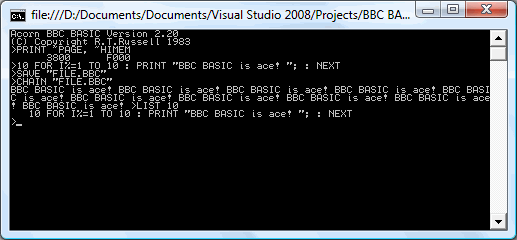
One thing I hadn't realised is that the graphics operations that BBC BASIC offers are actually implemented via the OSWRCH handler (OS WRite CHaracter), which means that BBC BASIC's PLOT, MOVE and DRAW commands will also be available, as well as any commands that use them indirectly (such as CIRCLE).
BBC BASIC
Monday, 19th May 2008
This is a project I initially attempted to get off the ground about four years ago, but never did. Anyhow, I've started work on it, and thanks to help from Richard Russell (the original developer) and J.G.Harston (who comparatively recently developed the Sinclair ZX Spectrum port) it looks like it should be possible this time around.
BBC BASIC was the native programming language on Acorn's BBC Micro. It's a structured BASIC dialect and supports procedures and functions, permitting far nicer code than the line-numbered GOTO and GOSUB code on other contemporary machines. It also has a built-in assembler, for inline assembly.
There is no source available, which is where the problems start to come in. Fortunately, J.G.Harston has developed a utility that permits the platform-agnostic BBC BASIC interpreter to be relocated. However, it assumes that the system has a jump table in RAM from $FF80..$FFFF (this jump table would be used to call platform-specific code); this memory range is not executable on the TI-83+. Execution protection in the $C000..$FFFF range may also cause issues for inline assembly code (which is, naturally, executed from RAM).
The TI-OS does not offer an especially suitable environment for BBC BASIC either; it is mainly menu driven (a command-line driven environment is preferable), does not have a plain text editor and does not use ASCII. To resolve this issues, I've concentrated on developing a suitable environment for BBC BASIC to live in, including a command-line interface and text editor.

Text files are stored as AppVars with a TEXTFILE header, and I've developed a Windows-based notepad clone for editing them (it saves and loads directly to and from .8xv). The following commands are currently supported (see here for a reference from the Windows verion): BYE, COPY, DELETE, DIR, ERASE, EXEC, QUIT, RENAME, TYPE, |.
To enter the editor, EDIT can be used. This presents a full-screen editor a little like the TI-OS program editor, but edits plain text files.
The interface transparently supports AT keyboards (which are rather easier to type on than the TI's keypad). The character resolution is 24 columns in 10 rows (4x6 pixel characters), giving you quite a lot of room to see what you're working on.
I intend on the final program being a 2-page Flash application; one page for BBC BASIC, and one page for the environment and OS interface. This unfortunately makes this a TI-83+ only project.
Even if I don't manage to shoe-horn BBC BASIC onto the TI-83+, the interface code (which uses direct hardware access for everything but opening and editing AppVars) could be useful for other projects.
CSG, fisheye and spotlights.
Monday, 5th May 2008
One way of constructing solids is to use a method named constructive solid geometry (or CSG for short). I added two simple CSG operators - intersection and subtraction - that both take two surfaces and return the result.

In the above image, the surface that makes up the ceiling is created by subtracting a sphere from a plane. Of course, much more interesting examples can be created. For example, here is the surface created by taking a sphere and subtracting three cylinders from it (each cylinder points directly along an axis).

One problem with the camera implementation was that it couldn't be rotated. To try and aid this, I used a spherical to cartesian conversion to generate the rays - which has the side-effect of images with "fisheye" distortion.


The above left image also demonstrates a small amount of refraction - something that I've not got working properly - through the surface. The above right image is the result of the intersection of three cylinders aligned along the x,y and z axes.
To try and combat the fisheye distortion, I hacked together a simple matrix structure that could be used to rotate the vectors generated by the earlier linear projection. The result looks a little less distorted!


The final addition to the raytracer before calling it a day was a spotlight. The spotlight has an origin, like the existing point light - but it adds a direction (in which it points) and an angle to specify how wide the beam is. In fact, there are two angles - if you're inside the inner one, you're fully lit; if you're outside the outer one, you're completely in the dark; if you're between the two then the light's intensity is blended accordingly.

In the above screenshot, a spotlight is shining down and backwards away from the camera towards a grid of spheres.
If you're interested in an extremely slow, buggy, and generally badly written raytracer, I've uploaded the C# 3 source and project file. The majority of the maths code has been pinched and hacked about from various sites on the internet, and there are no performance optimisations in place. I do not plan on taking this project any further.

Building and running the project will result in the above image, though you may well wish to put the kettle on and make yourself a cup of tea whilst it's working.