Patch files
Monday, 15th May 2006
I added Emukon patch file export to Brass - Brass will export all the labels, variables and breakpoints from the source and Emukon can then load them in. It makes debugging much simpler...

In my Game Gear-related fiddling, I optimised the tween demo code significantly, but then slowed it back down again by adding 4 more points, extending the rotation code to using 16.16 rather than 16.8 fixed-point and using a proper linear tween. It's still a bit smoother, though:

Structs and sensible variable layout
Tuesday, 9th May 2006
When developing an assembly program, you need to 'declare variables' by attaching an address (in RAM) to a label.
The problem here, of course, is having to calculate all the relevant positions in RAM for each variable. For example,
ram = $C000 ; Assume RAM starts at address $C000

var1 = ram+0
var2 = ram+1
var3 = ram+3 ; var2 is 2 bytes!
; ... and so on ...
Now this is fairly painful. So, I added .varloc and .var directives to Brass:
ram = $C000 ; Assume RAM starts at address $C000

.varloc ram, 1024 ; 1024B in size

.var 1, var1
.var 2, var2
.var 1, var3
; ... and so on ...
This eases things a bit, but what if you have lots of variables and a number of different RAM areas? Now you still have to shuffle things around to fit. So, now, Brass allows you to define multiple areas of memory for variables (through multiple .varloc statements) and shuffles around all the variables to best fit in the available memory. Variables defined using .tempvar can even overwrite eachother (provided they are in different, not-nested modules) to save space.
Of course, sometimes you need variables to share consecutive areas of RAM, so I also added structure support.
; Define it

.struct Point2D
    .var db, X
    .var db, Y
.endstruct

; Use it

.var Point2D, Me

    ld a,10
    ld (Me.X),a

    ld a,32
    ld (Me.Y),a

    ld hl,10+32*256
    ld (Me),hl

; Or even:

.struct Point3D
    .var Point2D, P
    .var db,      Z
.endstruct

.var Point3D, You

    ld a,(You.P.X)
And, to comply with the picture requirement, have something ancient and completely unrelated.

A productive weekend
Wednesday, 3rd May 2006
What with the weekend having an extra Monday tacked on for good measure (Labour Day), I felt the need to be productive.
I also felt the need to listen to VGM files converted to MIDI, so rustled up a VGM to MIDI converter. There already is one (available on the SMS Power! site), but I could never get it to work.
Having never really puzzled out the YM2413 ('OPLL', FM chip) I limited it to the square-wave generating PSG.
First of all, you need to be able to convert a tone register value (from 0 to 1023), the period of the output square wave, to a MIDI key value (0 to 127, where every 12 keys represent an octave).
This is easiest if you have a real frequency (in Hertz) to work with, so I have the formulae:
Frequency = ClockSpeed ÷ (32 × ToneReg)
Key = 12 × Log2|Frequency × Constant|
ClockSpeed is the clock speed of the PSG in Hertz. Constant is a precalculated constant used to scale the frequency to a range so that 440Hz ends up being played as key A, octave 5.
As it is unlikely you'll get a round number with this, I rely on adjusting the MIDI pitch wheel. Now it's a case of detecting attacks (when the volume of a channel increases) and releases (when the volume of a channel is set to 0) to create MIDI key press and release messages.
Percussion (white noise from the PSG) is handled the same way, except that instead of using mapping frequencies to keys and pitch wheels it plays one of 3 different drums corresponding to the 3 different pitches of noise.
It works fairly well, and you can download the software and source from the site here.
You can also listen to some samples:
- Power Strike 2 (GG) - Weapon Select
- Ristar (GG) - Du-Di-Da!
- Marble Madness - Tune 09
- The Flash - Trickster for Mayor
- Sega Chess - White Wins
- Sonic Chaos - Mecha Green Hill Zone
- Sonic the Hedgehog - Bonus Zone
- Ys - Holders of Power
The problem with sound-related apps is that they don't provide very interesting screenshots, so I took on a little side project that I hoped would. (After all, journals are a bit dull if they're plain text).

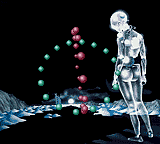
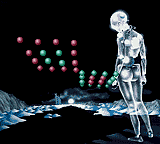

Yep, it's that 3MHz, 32-colour, 8KB powerhouse the Sega Game Gear again.
Looking on pouet.net, there is only one Game Gear demo on there. If I haven't got it in me to complete a full-blown game, I can at least try and contribute something.  After all, it's a relatively simple Z80 system to write programs for.
Have the typically poorly-shot video to see it in action:
(The odd flickering horizontal band that sometimes appears is a case of me using up the 8 sprite per scanline ration).
Further Brass development
Friday, 28th April 2006
One of my ongoing projects is Brass, a Z80 assembler.
The newest release adds all sort of goodness, especially nested modules - for example:
.nestmodules
.local
.module Animals

    .module Cat
        Legs = 4
    .endmodule

    .echo "Humans have ", Human.Legs, " legs.\n"

    .module Human
        Legs = 2
        .module Brother
            Age = 17
            .echo "My sister is ", Animals.Human.Sister.Age, " years old.\n"
        .endmodule
        .module Sister
            Age = 21
            .global
                Arms = 2
            .endglobal
        .endmodule
    .endmodule

    .module Spider
        Legs = 8
        .echo "A spider has ", Legs, " legs.\n"
    .endmodule

.endmodule

.echo "Cats have ", Animals.Cat.Legs, " legs.\n"
.echo "My brother is ", Animals.Human.Brother.Age, " years old.\n"
.echo "My sister has ", Arms, " arms (global!)\n"
It also now allows for unsquished binaries (where each byte is expanded to two ASCII characters - the hexadecimal representation of the byte. This is used in native TI-83 programs).
I'm trying to unify (to some extent) 82, 83 and 83+ programming (as the hardware is fairly standard between them) - hopefully, fairly carefully written source code should be able to be assembled to 82, 83 and 83+ binaries for a variety of shells with a single keypress from Latenite. TI haven't made this easy with large inconsistency between system call names and variable names...
DOOM Source
Thursday, 20th April 2006
You can download the source to the DOOM project below here.
It's a real mess in places, mainly in the way it loads level geometry. DirectX initialisation is hard-coded with no fallback code if some feature is missing or unsupported.
Usage: DOOM <iwad> <level>
eg:
DOOM DOOM2.WAD MAP31
DOOM DOOM.WAD E1M3
DOOM TNT.WAD MAP03
Keys: use the cursor keys to move around, A and Z to move up and down.
Broken:
- Floor splitting is abysmal. It is highly inefficient and occasionally wrong. The floor splitting code breaks sectors into horizontal spans which it then splits into triangles - uneven vertex placement results in largish cracks between sectors or "hairline" dancing-pixel cracks inside sectors. Large holes are usually the case of a sector that "overflows" another one. Ideally; decode floors via ssector/seg information or just use glBSP.
- Timing (level animation) is done via the primitive Timer class. If something starts to hog CPU time, the timers all slow down leading to inconsistent animation speeds.
- Scrolling walls and light effects are controlled differently; sector light effects (which affect a large amount of geometry) save the vertex array written to the vertex buffer away; this array is changed then sent to a vertex buffer, overwriting the existing data. The scrolling walls (affect a small amount of geometry) read the vertex buffer, alter the texture coordinates, then write it back. This results in a confict; if a linedef has both scrolling AND lighting effects, every time the light level changes the scroll offset is reset to the original linedef's value.
- Skies that occlude geometry that is visible normally aren't handled correctly.
- Player start angle is occasionally backwards.
- Some of the more bizarre walls still don't display properly.